The Topological Naming Problem: Why Parametric CAD Breaks (And Why AI Makes It Worse)
The topological naming problem has plagued parametric CAD for 30 years. Now AI is making it worse. Here's what it is, why it matters, and how a different approach might help.
If you've ever changed a dimension in your CAD model and watched downstream features explode into errors, you've experienced the topological naming problem. You just didn't know it had a name.
This isn't a bug. It's a fundamental challenge that every parametric CAD system—from SolidWorks to Fusion 360 to FreeCAD—has wrestled with for over three decades. And now, as AI enters the CAD space, this old problem is becoming a new crisis.
What Is the Topological Naming Problem?
Parametric CAD works by building models through a sequence of operations. You sketch a rectangle, extrude it into a box, then place a hole on the top face. Each operation references geometry from previous steps.
Here's where it gets tricky: the CAD kernel identifies faces and edges by internal indices. Your "top face" isn't stored as "top face"—it's stored as "Face #4."
Now change something early in your model. Maybe you add a chamfer to an edge. Suddenly the kernel recalculates all the geometry, and the indices shift. Face #4 becomes Face #7. Or it splits into multiple faces. Or it disappears entirely.
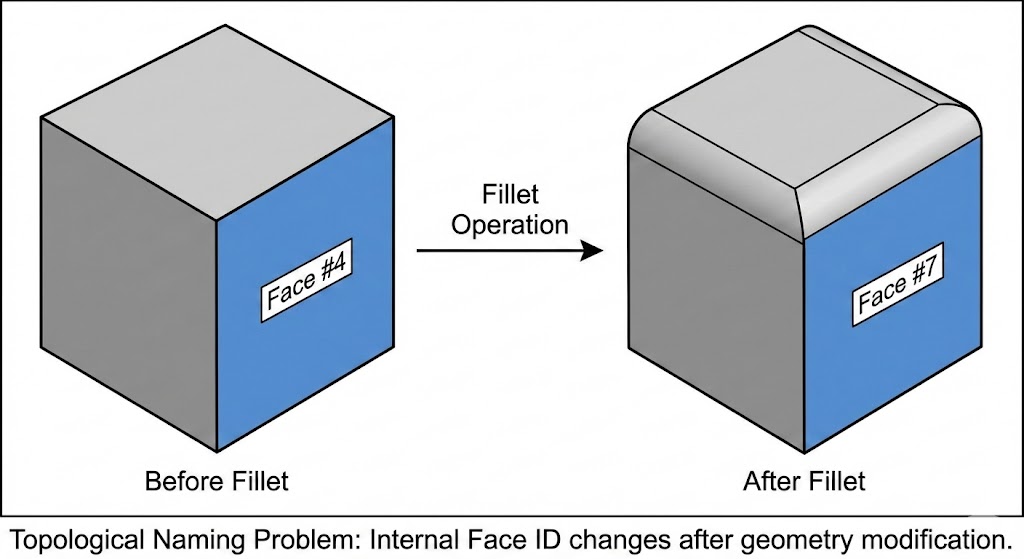
Your hole feature still says "place on Face #4." But Face #4 is now a side face. Your model breaks.
This is the topological naming problem (TNP): parametric references are fragile because they're tied to arbitrary indices, not meaningful identities.
Every CAD System Has This Problem
The FreeCAD community has talked about TNP openly for years, finally shipping a major mitigation in 2024. But don't think commercial tools are immune.
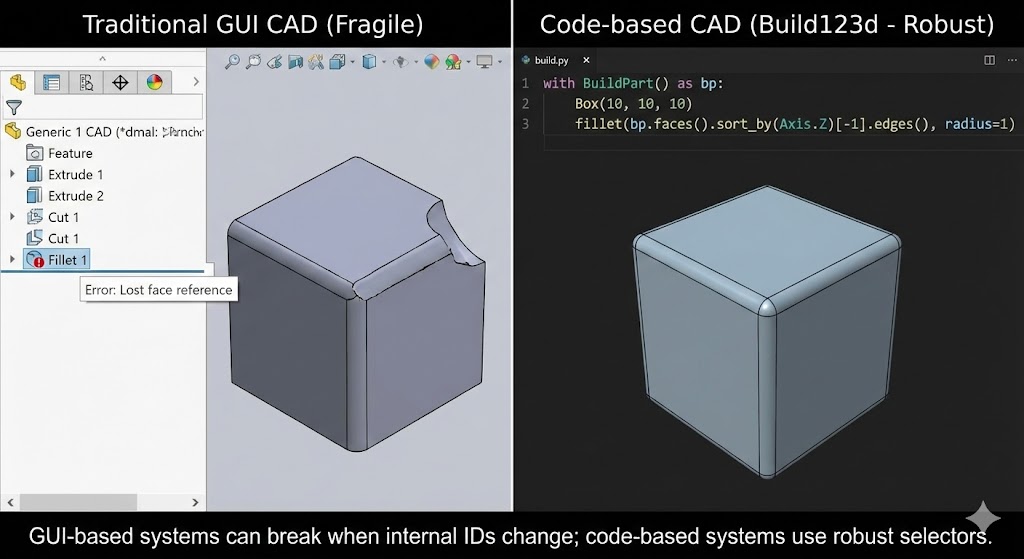
SolidWorks, Fusion 360, Onshape, Inventor—they all experience TNP. They've just invested decades into heuristics that make it less visible. When you modify an early feature, these systems use pattern matching, geometric similarity, and educated guesses to figure out which new face "probably" corresponds to your old reference.
Usually it works. Sometimes it doesn't. Experienced CAD users know the sinking feeling of a model that suddenly shows a cascade of red errors after a simple change.
As one Reddit user put it: "TPN will never be truly fixed by anyone. At best, you can just get a CAD program to fail more gracefully."
Why AI Makes This Worse
Here's where the story takes a turn.
Traditional CAD users can work around TNP through experience. They learn to reference stable geometry—construction planes instead of model faces, carefully ordered features, defensive modeling practices.
AI doesn't have that experience.
Large language models are what researchers call "spatially blind." Recent studies show that even advanced multimodal models struggle with 3D spatial relationships—they can't reliably track which face is which, how geometry changes when operations are applied, or where in 3D space a feature ends up.
When an AI generates CAD operations through a traditional parametric workflow, it's essentially flying blind through the topology. It might successfully create a box and extrude a boss, but then reference "Face #4" for a hole—with no way to know if that's actually the face it intended. When the model regenerates and indices shift, the AI has no strategy for recovery.
This is why most "AI CAD" demos stay simple. A box with a hole? No problem. A bracket with mounting holes, fillets, and a cut pattern? The topology changes cascade faster than the AI can track.
The Traditional Solutions (And Their Limits)
CAD vendors have developed several approaches over the years:
Persistent naming algorithms try to generate stable identifiers based on how faces were created. "The face generated by extruding this edge" is more stable than "Face #4." But these identifiers can still fail when the creation history becomes ambiguous. Heuristic matching compares geometric properties—area, position, normal direction—to guess which new face corresponds to an old reference. It works until you have multiple similar faces. User intervention remains the ultimate fallback. When the system can't figure it out, you click on the correct face. This works for humans; it doesn't work for AI.None of these solutions fully solve TNP. They just hide it well enough that users can be productive most of the time.
A Different Angle: Code-Based CAD
What if instead of trying to solve TNP in the kernel, you sidestep it entirely?
This is the thinking behind code-based CAD tools like CadQuery and Build123d. Instead of a GUI-driven feature tree with implicit face references, you write explicit Python code that describes your geometry.
from build123d import *
Create base
base = Box(100, 60, 10)
Add boss on top - explicit reference via position
with Locations((0, 0, 10)):
    boss = Cylinder(20, 15)
result = base + boss
There's no "Face #4" to break. The geometry is described procedurally. If you need to modify the base, you change the parameters—the code regenerates the entire model from scratch.
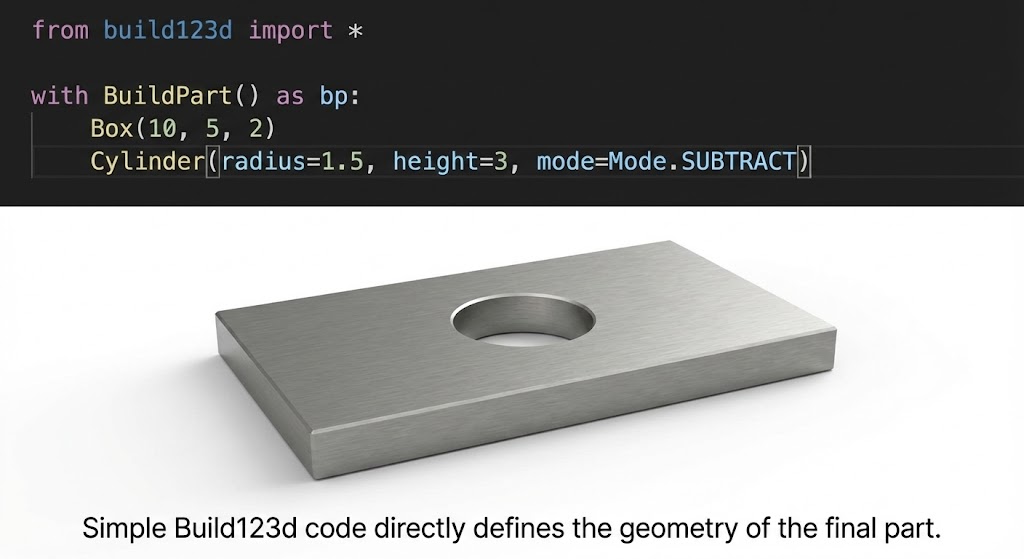
For AI, this is a much more natural interface. LLMs are good at generating code. They understand functions, parameters, and procedural logic. The same capabilities that make AI effective at writing Python make it effective at writing parametric CAD code.
The tradeoff? You lose some of the interactive editing that GUI CAD provides. But you gain reproducibility, version control, and an interface that AI can actually work with reliably.
Where We're Headed
At Henqo, we're betting on this code-first approach. Our system generates Build123d Python code from natural language descriptions, executes it, and outputs manufacturing-ready STEP files.
We're not claiming to have "solved" the topological naming problem—that's a 30-year challenge that the best minds in CAD are still working on. Instead, we're taking a page from how Claude Code helps developers: build scaffolding that helps the AI work effectively within the medium.
For code, that means context management, error recovery, and iterative refinement. For CAD, it means code-based geometry, execution feedback loops, and output validation.
The goal isn't to make AI understand topology. It's to give AI a representation where topology doesn't need to be understood—where the code itself is the source of truth, regenerated fresh each time.
---
We're building Henqo to make AI-generated CAD actually manufacturable. If you've fought with TNP or tried to get AI to generate usable 3D models, we'd love to hear your experience at henqo.com.